1. Dashboard
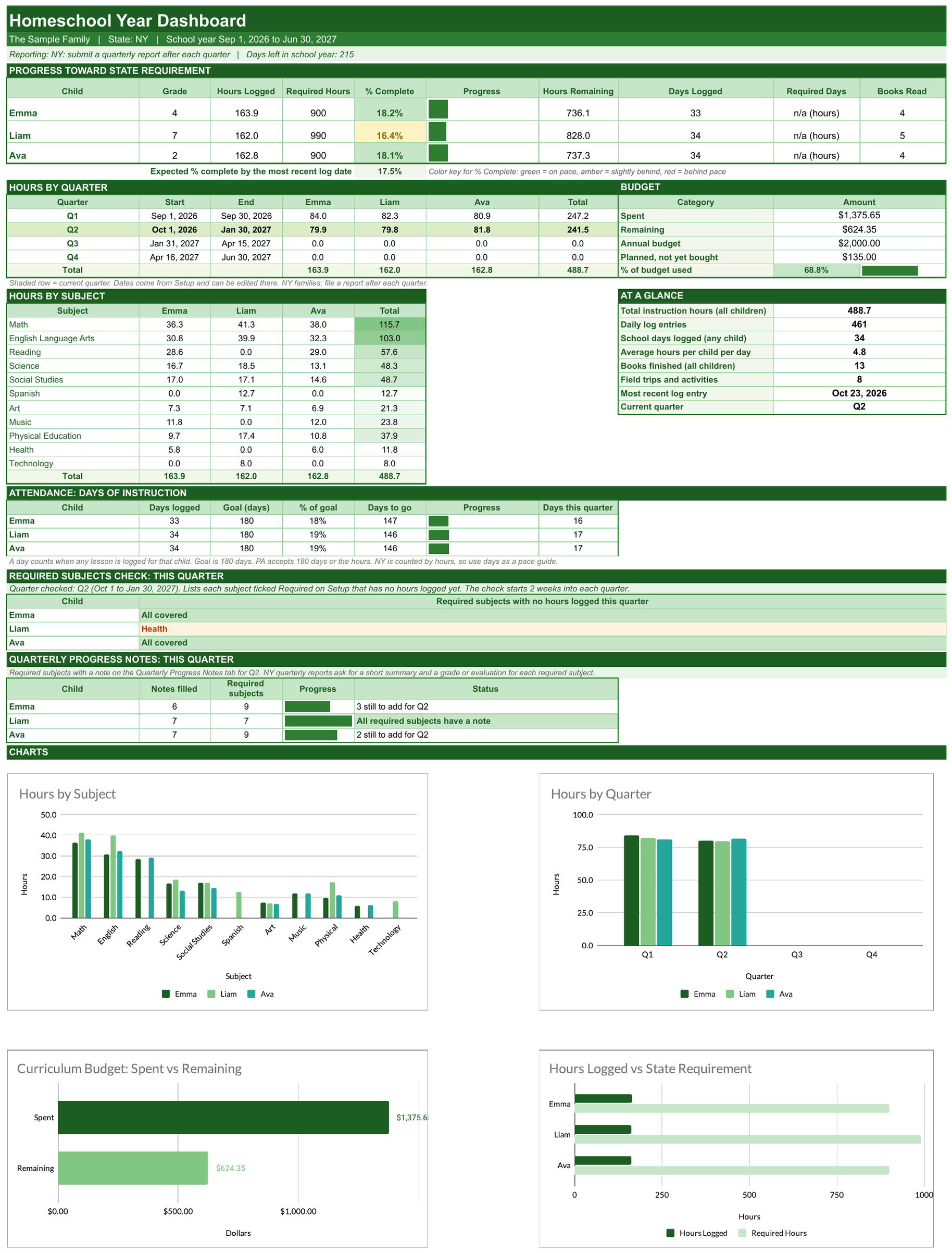
Shows total hours logged, hours remaining, days logged, expected pace, quarterly totals, subject breakdowns, budget remaining, and four charts.
Google Sheets workbook for NY and PA families
Log daily lessons, check off weekly plans, track books and field trips, and watch your New York or Pennsylvania hour totals and curriculum budget update automatically.
New to Google Sheets? Read the getting started guide. You can also download a PDF.
Free, no ads, no strings, just your email. No ongoing fee for the template, and included free with every Evergreen plan.
You fill in the Setup tab once at the start of the year. After that, every log entry, book finished, and curriculum purchase rolls straight into your Dashboard.
Ten connected tabs in Google Sheets, with dropdowns, formulas, and charts already wired up.
Shows total hours logged, hours remaining, days logged, expected pace, quarterly totals, subject breakdowns, budget remaining, and four charts.
Enter your family name, state (NY or PA), school year dates, annual curriculum budget, up to three children with their grades, and subjects. Quarter dates and required hours fill in automatically.
Pick the date, child, and subject from dropdowns, enter minutes taught, and add a short note and resource used. Minutes convert to hours across the workbook.
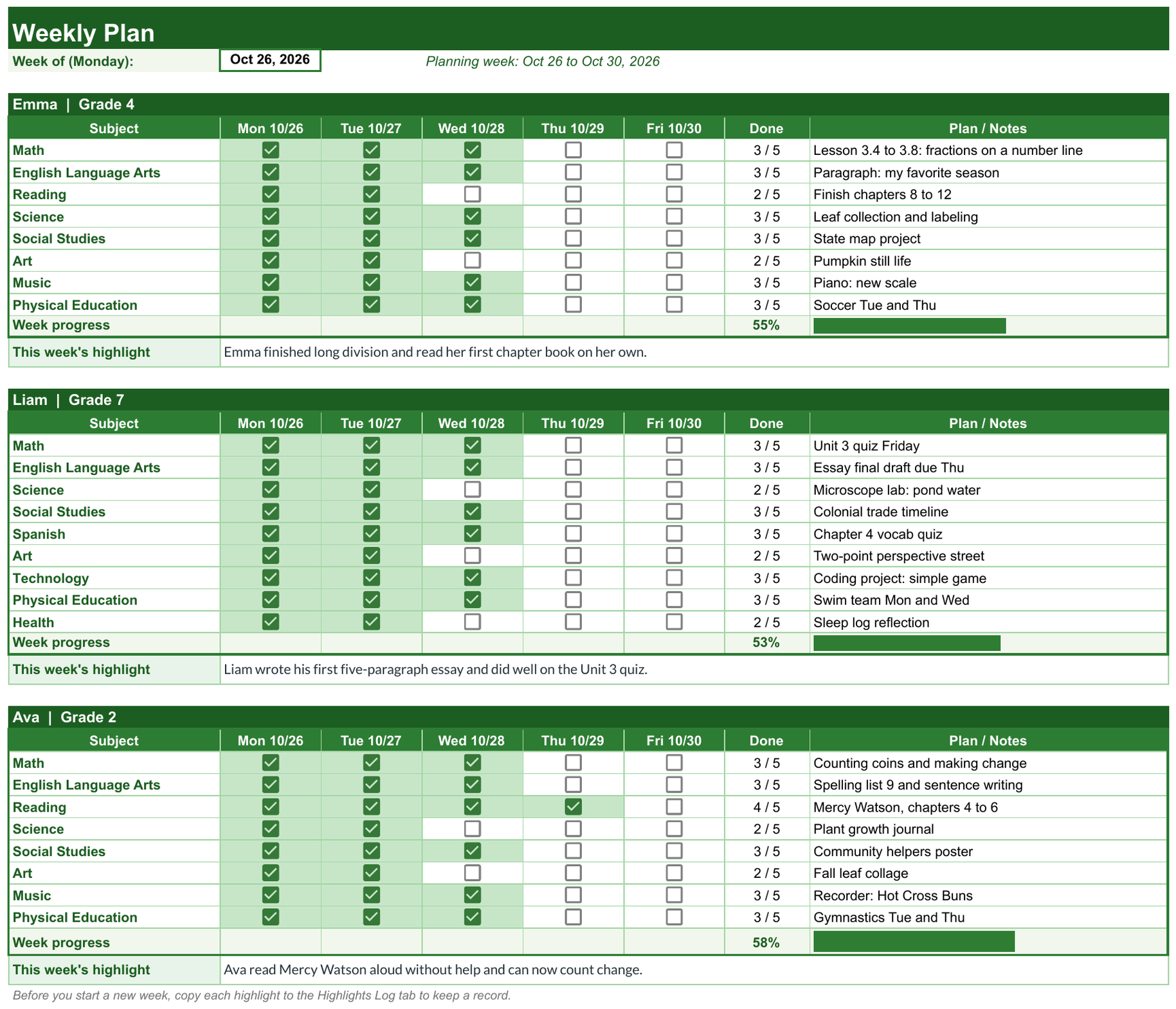
Monday through Friday checkboxes for each child's subjects, automatic done counts (like 3 / 5), a weekly progress bar, and space for notes.
Track items you have bought or still plan to buy by child and subject, compared against your annual budget.
Keep a running list of titles, authors, and dates finished per child, with an optional subject. Finished books feed straight into your Dashboard totals, and the list doubles as the reading materials list a Pennsylvania portfolio needs.
Record dates, locations, children included, subjects covered, and notes so hands-on days never get forgotten at the end of a quarter.
A place to keep each child's weekly highlight from the Weekly Plan, so good moments are saved for your reports.
For each child, quarter and subject, write a short note on what you covered and pick a rating or letter grade. This is the summary New York quarterly reports ask for, and the Dashboard shows how many are filled in this quarter.
Record each child's annual assessment (a test score or a written narrative) and, for Pennsylvania, standardized test results for grades 3, 5 and 8. The Setup tab also has a spot for a link to your folder of work samples.
Pick your state on the Setup tab and the workbook adjusts your targets and summary line automatically:
General planning summary only. Always confirm current requirements with your school district or evaluator.
Get the blank Google Sheets template free, or let us preload your family's details for you. The Done-for-you setup is a one-time payment in US dollars through Stripe.
Not a spreadsheet person? We'll set it up for you. Choose Done-for-you setup below.
Self-serve template
Leave your email, make your own copy, and start logging in minutes.
Freeno ads, no strings, just your email
Your free Homeschool Year Tracker is ready. Make your own private copy in Google Sheets, then see the getting started guide if you'd like a walkthrough.
Done-for-you setup
Send us your kids, grades, subjects, and curriculum. We load your tracker for you.
$39one-time
One-time payment. No subscription.
Evergreen members
Already subscribed to Essentials, Done-for-you, or Plus, or thinking about joining? The Homeschool Year Tracker template is included free with any active Evergreen Homeschool Records subscription. See Evergreen plans.
A free Google account. After you leave your email, you click the link to make your own private copy in your Google Drive. It works in any web browser and in the Google Sheets mobile app. For step-by-step help, see the getting started guide.
Yes. Once you have your copy, you can duplicate your blank copy before each new school year and update the dates on Setup.
Right after checkout, you fill in a short form with your state, children, grades, subjects, and curriculum items. We build your personalized workbook and email your private Google Sheets copy link to you within 1 business day.
No. This workbook is a record-keeping tool you fill in yourself. If you want a real person to prepare your NY quarterly reports or PA portfolio summaries for you, check out our quarterly and yearly plans (which also include the tracker for free).